Best Fiat to Crypto Exchange in 2026: How to Buy Crypto With Local Currency
Compare Bitunix, BingX and BloFin for fiat-to-crypto buying in 2026, including local currency options, payment methods, fees, safety and trading access.


In the fast-paced world of crypto trading, understanding different order types is crucial for maximising profit and minimising risk. One such order type is the reduce-only order, a valuable tool for traders who want to manage their positions more effectively.
Whether you’re a seasoned trader or just getting started, grasping how reduce-only orders work can help you make more informed trading decisions.
In this article, we will take you through what a reduce-only order means, why is it beneficial and how to set a reduce-only order on Bitunix.
The “Reduce Only” option ensures that any new order you place will only reduce your existing position rather than increase it. This means that the order will only close or decrease the size of your current position, not open a new position in the opposite direction or add to your current one.
For example, if you place a reduce only condition on your order, then it will automatically reduce the size of your long position to ensure no new positions (short sell in this case) will be initiated and esecuted that order exceeds your current long position.
Using the “Reduce Only” option is particularly helpful for traders who want to ensure they are correctly managing their exposure, especially in a fast-moving market where order execution might not always go as planned.
[maxbutton name=”Start Trading”]
Using reduce-only orders in futures trading offers several significant benefits that enhance risk management, position control, and execution assurance.
By ensuring that the order only reduces an existing position rather than opening a new one, traders can avoid unintentional risk, which is particularly crucial in volatile markets where sudden price movements can lead to substantial losses.
This is especially beneficial for traders managing large or complex portfolios, where precision in position management is essential.
This ensures that the outcome of the order is fully controlled and predictable, which is a significant advantage when managing positions that must adhere to specific risk parameters. Overall, reduce-only orders are a valuable tool for maintaining disciplined trading practices and minimizing unnecessary risks in futures markets.
Using a reduce-only condition on futures orders on Bitunix is straightforward. Read the step by step guide below to create a reduce-only futures order on Bitunix.

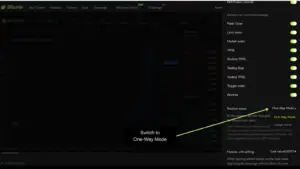
If you are not able to execute a reduce-only order, then your account has the hedge mode turned on. To change this, follow the instructions below.
1. Head over to your Trading Panel and select the icon as shown in the image below

2. Now, click on Position Mode and choose One-Way Mode as shown in the image below.
[maxbutton name=”Start Trading”]
Setting a reduce-only futures order on a crypto exchange is a straightforward process that provides an extra layer of risk management.
By ensuring that your trades only act to close or decrease existing positions, you can maintain better control over your trading strategy and avoid unintended increases in exposure. Always remember to review your orders carefully and make sure the reduce-only option is activated to align your trades with your desired outcomes.