How AAPLUSDT Trading Works on Bitunix
Learn how to trade Apple stock on Bitunix with USDT, understand how AAPLUSDT works, and explore volatility, leverage, and risk management for beginners.

Futures grid trading is a structured way to automate trading in perpetual futures when you expect price to move within a defined range. Instead of watching charts all day, you can use a futures grid bot to place a series of buy and sell orders automatically. This article explains what futures grid trading is, how a futures grid strategy works, and how to use futures grid bot settings on the Bitunix exchange.
Futures grid trading does not guarantee profits. Results depend on market conditions. Using leverage can increase both potential gains and potential losses, including liquidation risk.
[ez-toc]
It is an automated strategy where a bot places multiple limit orders inside a predefined price range for a perpetual futures pair. You decide the minimum price, maximum price, number of grids, direction, leverage, and margin amount. The futures grid bot then calculates grid levels and places orders at those levels.
The goal of a futures grid strategy is to capture repeated price movement within the range. The bot aims to buy at lower grid levels and sell at higher grid levels as price moves back and forth. On the Bitunix exchange, you can set the direction to long or short depending on your market view.
A futures grid bot splits your chosen range into smaller intervals called grids. Each interval represents a price level where the bot may place a limit order. When price moves down into lower grids, the bot can place buy orders. When price moves up into higher grids, the bot can place sell orders. Over time, this can create multiple small realized gains when price continues to oscillate inside the range.
A crypto futures grid bot works best when price stays inside your chosen range. If price breaks out and remains outside, the bot may stop trading or pause, depending on platform logic and the conditions of the selected pair.
A futures grid strategy is rules based and range focused. You define the structure, and the bot executes it. The strategy is commonly used when you expect sideways movement, repeated swings, or stable volatility conditions.
Typical scenarios include:
If the market trends strongly in one direction, grid performance can weaken because fewer trades may occur within the range, or the bot may pause if price leaves the range.
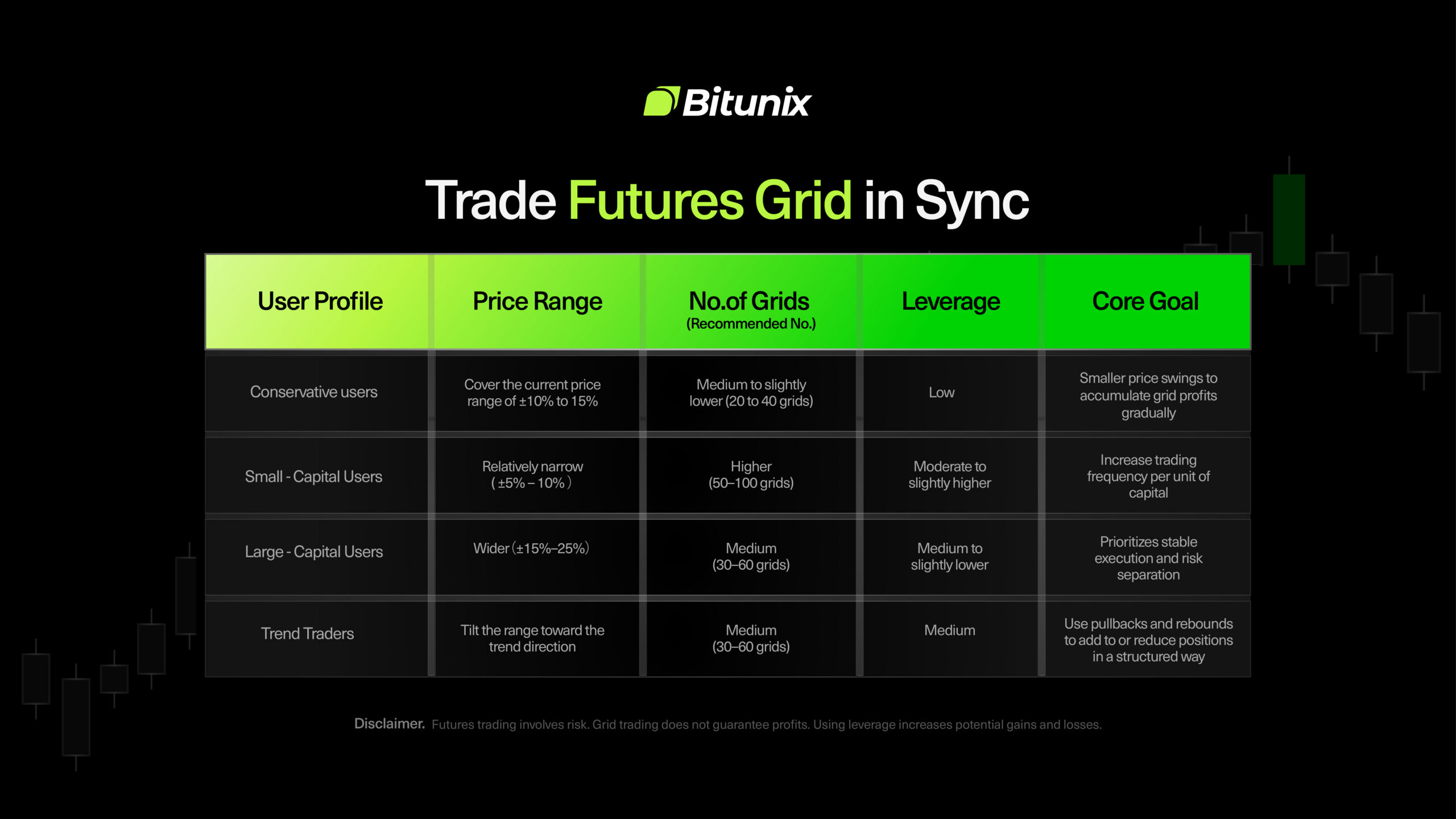
Futures grid parameters explained clearly can help avoid common setup mistakes. The most important inputs control how often the bot trades, how much profit is targeted per grid, and how much risk you take.
Your price range is the boundary where the bot can trade.
If price exits the range, the bot may pause until price returns.
The number of grids sets how many intervals the bot uses inside the range. More grids typically means:
Fewer grids typically mean:
On Bitunix, the number of grids can be set from 2 to 200.
Futures grid long vs short determines the bias of the strategy.
Direction selection matters because unrealized PnL can move against you if price trends opposite to your bias.
Futures grid leverage settings affect margin requirements and liquidation distance. Higher leverage can make the strategy more capital efficient, but it also brings liquidation closer and increases sensitivity to price moves.
For a general approach, you can think of leverage as:
Leverage should be matched with your margin size, range width, and stop loss plan.
Margin is the amount you allocate to run the strategy. On Bitunix, the system calculates a minimum investment requirement based on your parameters. Your margin must be higher than the minimum shown.
Futures grid bot risk management mainly comes from setting boundaries and limits.
This section is a practical, step-by-step guide to setting up Futures Grid on the Bitunix web trading interface.
Before you create a Futures Grid bot, make sure you have enough USDT in your Spot Account.
On Bitunix, Futures Grid Trading uses Spot Account funds as collateral. This helps prevent bot allocations from affecting cross margin positions in your Futures Account. If grid margin were taken from the Futures Account, it could reduce the available margin supporting open cross margin positions and increase liquidation pressure during volatility.
To prepare funds using Internal Transfer:
Important: Each grid bot is independent. Allocate margin per bot and avoid committing most of your available funds to one strategy.
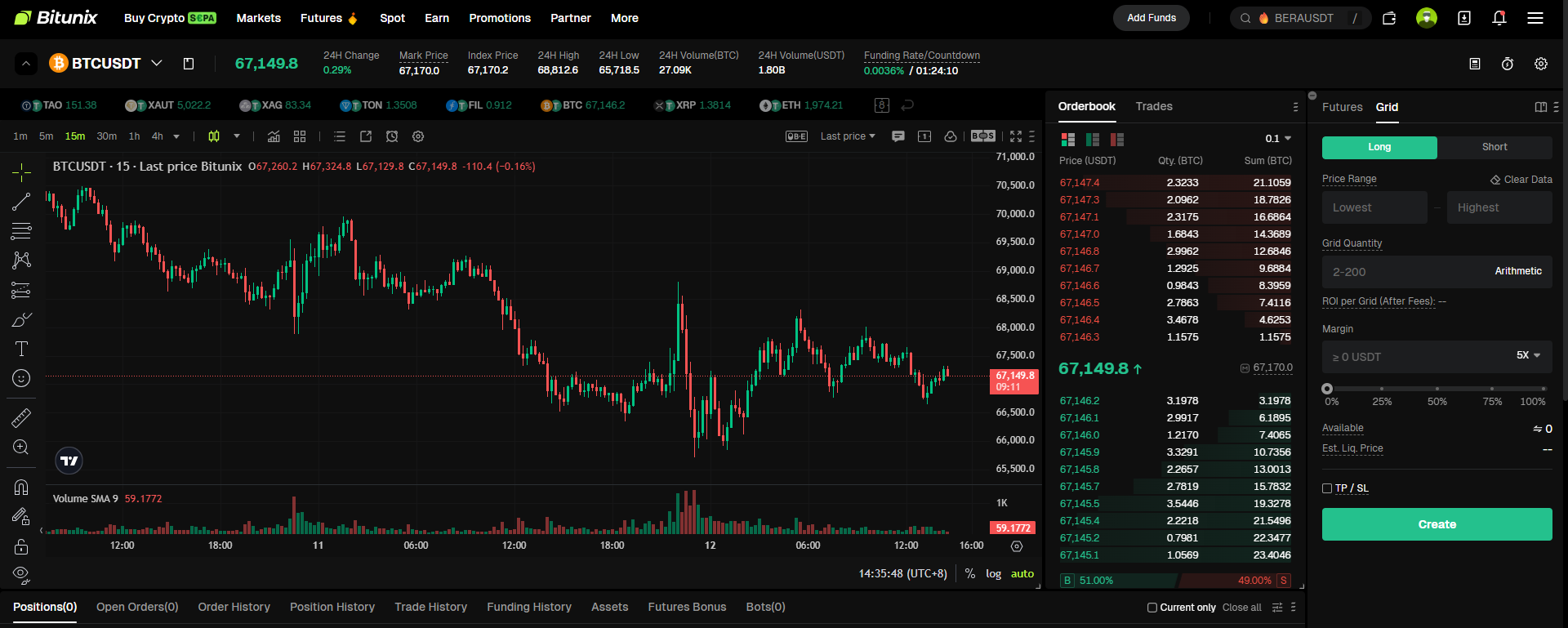
Note: On the website, Futures Grid settings are configured in the right panel under Grid, while the chart remains on the left.
In the Price Range section:
Tip: The bot trades only within this range. If price moves outside the range, the bot may pause until price returns.
General guidance:
Reminder: Higher leverage increases liquidation risk and reduces your margin buffer. Match leverage with your range width and risk tolerance.
After creation, monitor the bot in the Futures interface. If the bot pauses, the most common reason is that market price has moved outside your selected range. When price returns to the range, the bot can resume trading, depending on the pair status and platform conditions.
If you cannot create a bot, check:
After creation, the system transfers funds to a dedicated Bot Account for grid trading. You can view bot funds and performance in Assets then Bot.
A bot may pause if price moves outside your set range or if the futures pair is under maintenance. Futures Grid trades only within the defined range. When price returns to the range, the bot resumes automatically if the pair is active.
Grid Profit is realized profit from completed grid trades. Total PnL includes unrealized PnL from the open position. If the market temporarily moves against your position direction, unrealized losses can exceed realized grid profit, making Total PnL negative in the short term.
When you stop the bot, the system cancels open orders and closes the position at the market price at that time. Market execution depends on order book depth and liquidity, so the final price may differ from expectations and can result in small slippage.
Futures grid trading is a rules based approach to automating perpetual futures trades within a defined range. By setting clear futures grid parameters explained in advance, choosing futures grid long vs short correctly, and applying sensible futures grid leverage settings, you can use a futures grid bot to execute a structured strategy with less manual monitoring. On the Bitunix exchange, you can create, monitor, and stop bots directly in the app, with each strategy operating independently.
Bitunix is a global cryptocurrency derivatives exchange trusted by over 3 million users across more than 100 countries. At Bitunix, we are committed to providing a transparent, compliant, and secure trading environment for every user. Our platform features a fast registration process and a user-friendly verification system supported by mandatory KYC to ensure safety and compliance. With global standards of protection through Proof of Reserves (POR) and the Bitunix Care Fund, we prioritize user trust and fund security. The K-Line Ultra chart system delivers a seamless trading experience for both beginners and advanced traders, while leverage of up to 200x and deep liquidity make Bitunix one of the most dynamic platforms in the market.
Bitunix Global Accounts
X | Telegram Announcements | Telegram Global | CoinMarketCap | Instagram | Facebook | LinkedIn | Reddit | Medium
Disclaimer: Trading digital assets involves risk and may result in the loss of capital. Always do your own research. Terms, conditions, and regional restrictions may apply.